

Isolated worktrees for parallel agents
Run multiple agents in separate git worktrees so tasks can proceed in parallel without stepping on one another’s files or branches.

Orca is an Agent Development Environment for shipping with coding agents, running multiple CLI agents in parallel across isolated worktrees, with desktop and mobile workflows.
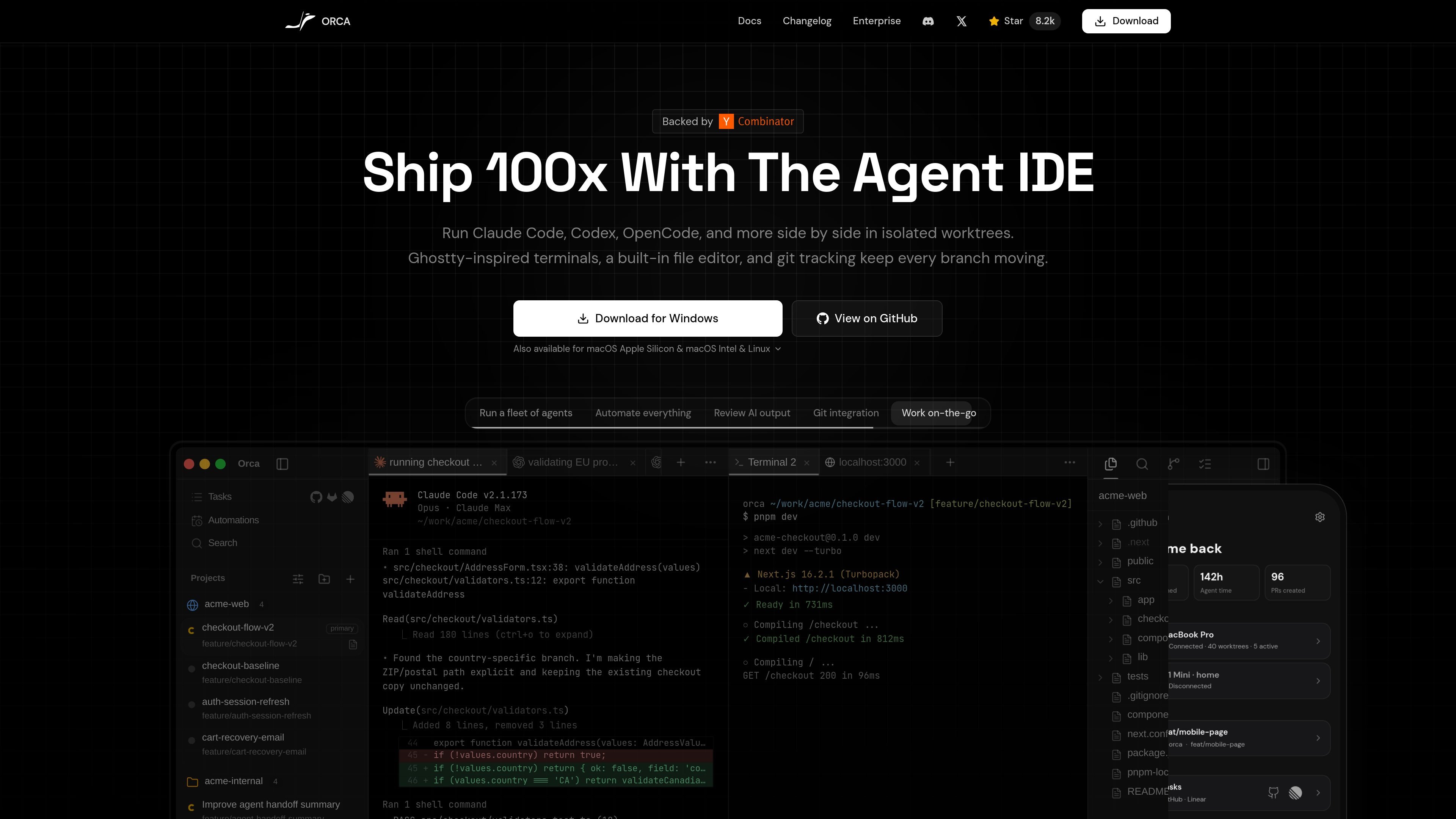
Orca is an Agent Development Environment for people shipping software with coding agents. It is built around running tools like Claude Code, Codex, Gemini, Cursor CLI, OpenCode, and other CLI agents in parallel across isolated git worktrees.
The product combines a desktop workspace, terminal sessions, a built-in editor, and git-aware project views so agents can work side by side without interfering with each other. The site also points to a mobile companion for iOS and Android, which lets you monitor agent status and keep work moving when you are away from your desk.
Run multiple agents in separate git worktrees so tasks can proceed in parallel without stepping on one another’s files or branches.
Use desktop shells, split terminals, and a built-in file editor in one workspace, with git tracking to keep changes visible while agents work.
Track active agents, task states, and recent work from a dashboard-style view so you can see what each agent is doing at a glance.
Open web pages in a Chromium window per worktree and pass HTML, CSS, and cropped screenshots into the agent when design or browser context matters.
Use the desktop app on macOS, Windows, or Linux, and pair it with mobile apps for iOS or Android to monitor agents away from your desk.
Install through desktop downloads, Homebrew on macOS, GitHub releases, TestFlight, the App Store, or an Android APK.
Use Orca when you want several coding agents to work on related tasks in parallel, each with its own isolated worktree and terminal context.
Use the browser, editor, and git-aware views to review agent output, inspect diffs, and decide which branch of work to keep moving forward.
Keep tabs on agent progress from a phone or tablet when you are away from your desk, then switch accounts or check usage from the companion app.
Run a remote or beefier SSH-connected environment when the local machine is not the best place to host several active worktrees and terminals.
Pair Orca with tools like Claude Code, Codex, or OpenCode when you already have subscriptions and want to use them side by side in one workflow.
Orca is a desktop and mobile companion environment for shipping with coding agents. The desktop app runs agents in isolated worktrees, while the mobile app helps you monitor and manage activity when you are away from your desk.
The site says Orca works with Claude Code, Codex, Gemini, Cursor CLI, OpenCode, Copilot, Grok, and other CLI agents. The download page also describes it as working with any other CLI agent that drops into the workflow.
The download page offers desktop builds for macOS, Windows, and Linux, plus mobile options for iOS and Android. The site also mentions macOS Intel and Apple Silicon builds.
The source shows a download page with desktop installers, Homebrew for macOS, GitHub releases, TestFlight, the App Store, and an Android APK. The pricing page URL returned 404, so no public plan details were available from the provided pages.
The source positions Orca as a worktree-based environment with terminals, a built-in editor, git tracking, browser or design workflows, and agent status views. That makes it suitable when you want multiple coding agents running side by side without interfering with each other.

Firebase Studio is a web-based workspace for full-stack app development with Gemini-assisted coding, app previews, cloud emulators, collaboration, and browser deployment.

AI Magicx is a unified AI workspace for chat, image, video, voice, music, email and developer tasks, helping teams and creators manage multiple models in one place.

Paper is a design tool that connects canvas, code, and AI agents so teams can create, share, and ship work in one workflow. Includes desktop app and MCP access.

blop is a QA agent that writes browser tests as code in your repo, runs them in CI, clusters repeated failures, and can open PRs to fix broken tests.

RLAMA is a local AI platform for building RAG systems and intelligent agents on macOS, Linux, and Windows, with HTTP API support.

Kastra authorization infrastructure for AI systems checks prompts, tool calls, shell commands, API requests, and browser actions before execution.