ClariLayer icon

ClariLayer

Revendiquer

ClariLayer is a personal context layer for AI coding and analysis agents, helping them retain data definitions, notes, and joins across sessions.

ClariLayer

Context layer for AI data agents

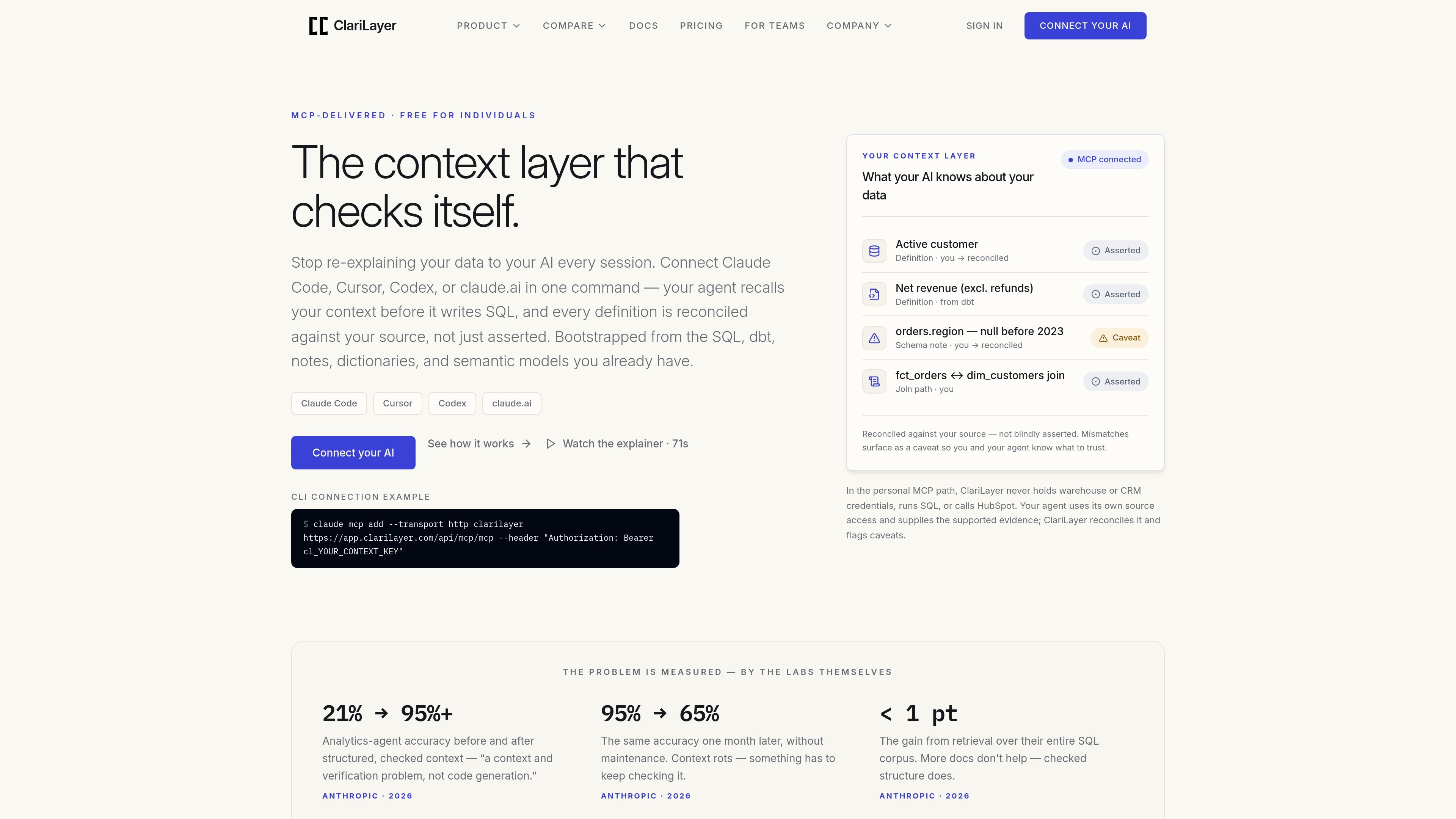
ClariLayer is a personal context layer for AI coding and analysis agents delivered over MCP. It is designed to help an agent remember and reuse data definitions, joins, schema notes, and other project context across sessions instead of making you restate them every time.

Its core workflow is not just storage but verification: you bootstrap context from existing sources, recall it while working, remember new corrections, and reconcile saved definitions against warehouse or HubSpot evidence so mismatches appear as caveats rather than confident errors.

Core capabilities

Bootstrap from existing sources

Import context from supported source material so the agent starts with your existing data definitions instead of an empty memory. The docs list SQL, dbt models, CLAUDE.md notes, dictionaries or codebooks, and semantic models.

Recall context during a session

Pull the most relevant saved context into the active task flow when the agent needs it. The docs describe this as recall-first, with context returned in-flow rather than forcing manual re-entry.

Remember corrections and notes

Persist definitions, schema notes, joins, and gotchas so the same corrections can carry across sessions. This is the mechanism that prevents repeated re-explanation.

Reconcile against evidence

Check a saved definition against warehouse actual_sample evidence or, for supported HubSpot contracts, row-free CRM evidence. When declared and observed evidence disagree, the entry surfaces a caveat.

Persist a completion receipt

Record the agent’s completion context before the task closes. The docs describe a completion loop that persists a bounded declaration or an explicit nothing-to-update receipt.

Work inside supported AI clients

Connect through MCP to Claude Code, Cursor, Codex, or claude.ai, with claude.ai also supported over OAuth. The quickstart and pricing pages both frame ClariLayer as a connected context layer rather than a standalone editor.

Practical use cases

  • Persistent context for recurring analysis

    Use ClariLayer when you keep repeating the same warehouse table names, join paths, or metric definitions to your agent in every new chat. The saved context can be recalled in-flow so the agent starts from your established working definitions.

  • Check definitions against source evidence

    Use reconcile when you want a saved SQL definition or HubSpot contract checked against evidence instead of trusted as plain text. The product is designed to surface a caveat when the declared definition and observed result disagree.

  • Import an existing analytics knowledge base

    Use bootstrap when you are bringing an existing analyst workspace into a context layer for the first time. Supported source material includes SQL, dbt, CLAUDE.md notes, dictionaries or codebooks, and semantic models.

  • Carry corrections across sessions

    Use ClariLayer when you want the agent to carry forward corrections, gotchas, and schema notes from one session to the next. Remembered entries are meant to reduce repeated setup work across chats.

  • Start solo before team adoption

    Use the free personal path if you are an individual analyst or developer who wants a context layer without seats, usage meters, or procurement. The pricing page positions the personal layer as the default starting point before any team governance.

Pros and Cons

Pros

  • It helps reduce repetitive re-explanation by keeping context available across sessions.
  • It distinguishes between asserted text and reconciled context, so mismatches are visible instead of hidden.
  • It supports a practical import path from existing analyst artifacts such as SQL, dbt, notes, dictionaries, and semantic models.
  • It works inside common AI clients through MCP, with claude.ai also supported over OAuth.
  • The personal plan is free and unmetered for individual use.

Cons

  • The personal reconciliation path is limited to supported evidence shapes, and the docs describe HubSpot reconciliation as the only supported CRM provider in the public v43 contract.
  • For the personal MCP path, ClariLayer is not the system that runs SQL or directly connects to your warehouse or CRM credentials; it depends on the agent’s own authorized access and evidence payloads.
  • Team-oriented governance is not generally available yet; the Governed Context Edge is in private pilot and requires early access.

FAQ

How do you connect ClariLayer to an AI agent?

ClariLayer connects as an MCP context layer for Claude Code, Cursor, Codex, or claude.ai. The docs describe a quickstart that connects an MCP client with a context key or connects claude.ai over OAuth, then confirms the connection so the agent can recall saved context.

What does ClariLayer do after setup?

The public docs describe four main verbs: bootstrap, recall, remember, and reconcile. Bootstrap imports supported source material, recall pulls relevant saved context during a task, remember saves definitions and notes for later, and reconcile checks a saved definition against warehouse or HubSpot evidence.

Is ClariLayer free to use?

ClariLayer supports personal use for one analyst at no cost. The pricing page says the personal context layer is free and unmetered, while the Governed Context Edge for teams is in private pilot and requires early access.

Does ClariLayer access my warehouse or CRM directly?

For the personal MCP path, ClariLayer never receives warehouse or CRM credentials and does not run SQL or call HubSpot itself. The agent uses its own authorized access and sends supported evidence for reconciliation.

What data sources and reconciliation paths are supported?

The docs say the personal context layer can bootstrap from SQL, dbt models, CLAUDE.md notes, a data dictionary or codebook, and semantic models. Reconcile supports warehouse actual_sample evidence and, for HubSpot, bounded row-free crm_evidence; Salesforce is recall-only in the public contract.

Quick Facts

Category
Developer Tool
Primary use
AI context layer for data agents
Connection method
MCP; claude.ai also over OAuth
Supported AI clients
Claude Code, Cursor, Codex, claude.ai
Source domain
clarilayer.com
Pricing
Personal use is free and unmetered; team product is in private pilot