

Browser-based speech to text
Upload audio or video files and let the AI convert speech into editable text directly in the browser.

DeVoice is a web-based speech to text and AI transcription tool for turning audio and video into editable text, with noise removal and workflow tools.
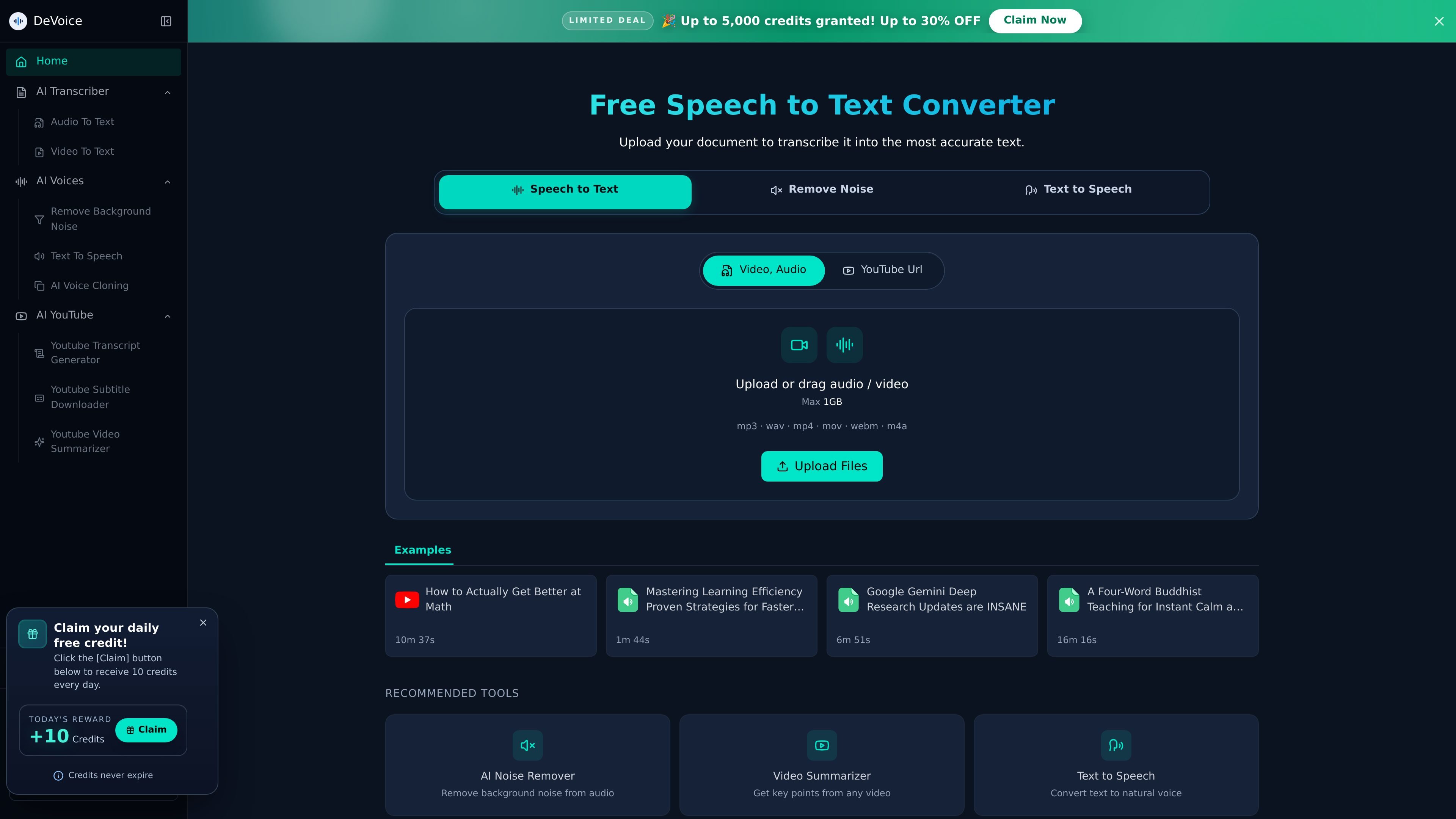
DeVoice is a web-based speech-to-text and transcription platform for converting audio and video into editable text. The site positions it as a free speech to text converter with AI transcription tools for files, YouTube content, and audio cleanup.
The core workflow is straightforward: upload an audio or video file, let the AI process the speech, and then copy, edit, or download the transcript. The site also includes a noise-removal tool and related transcription utilities, which make it useful for podcasts, meetings, interviews, lectures, and other recorded content.
Upload audio or video files and let the AI convert speech into editable text directly in the browser.
The homepage says DeVoice works with MP3, WAV, M4A, MP4, MOV, WEBM, and similar formats, with transcription pages showing uploads up to 1GB.
The site says DeVoice handles 50+ languages and is designed to process accents, fast speech, and background noise with improved recognition.
Transcription pages describe automatic speech detection, filler-word removal, and structured output that can be copied, edited, or downloaded.
The noise-removal page offers AI cleaning for recordings before transcription, with preview and download options for the cleaned file.
Pricing pages list one-time credit packages with priority processing queue, unlimited file downloads, and email support.
Turn recorded meetings and calls into text so action items and decisions are easier to review, share, and archive.
Convert podcasts and interviews into written transcripts for show notes, articles, newsletters, subtitles, or social snippets.
Create readable transcripts for lectures, webinars, tutorials, and other educational recordings to improve searchability and accessibility.
Clean up noisy recordings before transcription when you want clearer speech from vlogs, field recordings, or casual footage.
Generate transcripts from uploaded video files or YouTube-linked content when you need text for research, summaries, or subtitle workflows.
Yes. The site presents DeVoice as a fully web-based tool, so you can upload files and transcribe them in the browser without installing software.
The rendered pages show supported uploads such as MP3, WAV, M4A, MP4, MOV, WEBM, and related formats, and the site says files up to 1GB can be uploaded on the transcription pages.
The product pages describe an upload, AI processing, and then copy, edit, or download workflow. For noise reduction, the page also mentions previewing the cleaned result before downloading.
The homepage says DeVoice supports 50+ languages and the transcription flow mentions multiple speakers and cleaner transcripts with filler words removed.
The pricing page shows one-time credit packages rather than a subscription flow, and the page notes that the subscription service is broken and users can prioritize purchasing credit packages.

NeverCap AI transcription tool for audio and video to editable text, with batch uploads, speaker labels, timestamps, and 100+ languages.

Altered is an AI voice changer and voice content creation platform for media production and live voice use. It combines voice morphing, text-to-speech, transcription, translation, cloning, and editing in one application.

Minutes is an AI note taking and transcription app for meetings, lectures, and recordings. Turn live audio, files, or YouTube links into notes, transcripts, and summaries.

Transkrip.com is an AI transcription tool for audio and video to text, focused on Bahasa Indonesia, long files, and per-file pricing.

Podsqueeze is an AI podcast production tool that generates transcripts, show notes, clips, audio enhancements, and branded podcast pages. It is aimed at podcasters, podcast managers, agencies, and media teams that want to repurpose episodes faster.

Wispr Flow is a cross-platform voice dictation tool for Mac, Windows, iPhone, and Android, with team controls for business use.