

Remote approvals
Send an approval request to your phone, Slack, or the web app when an agent reaches a step that needs your decision, then continue the task after you respond.

Pushary is a human-in-the-loop control panel for AI agents that sends approval requests to your phone, Slack, or the web app so work can continue when permission is needed.
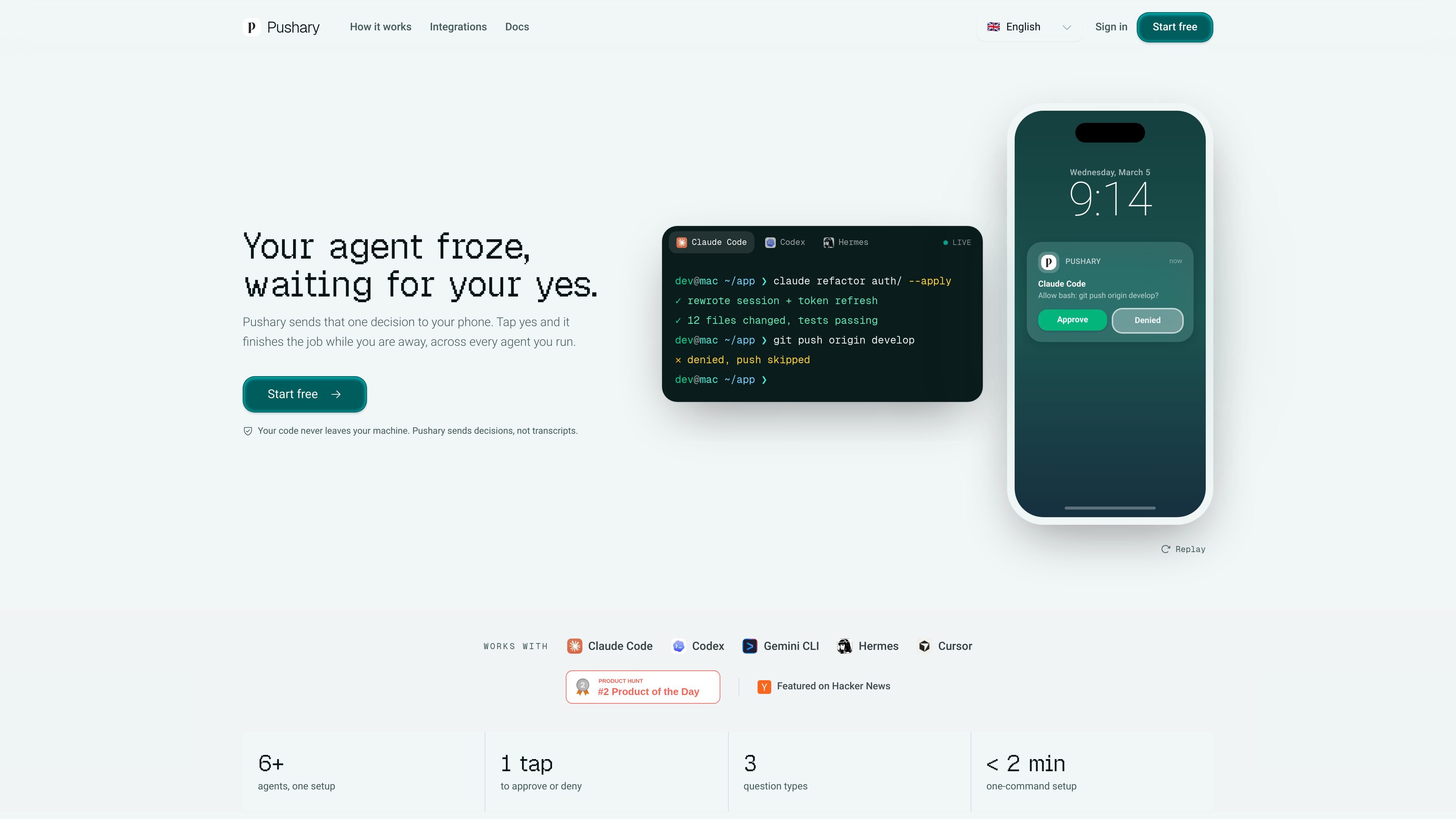
Pushary is a control panel for AI agents that routes permission requests and task-completion alerts to your phone, Slack, the web app, and an audit trail. It is built for human-in-the-loop workflows where an agent needs a quick yes, no, or other response before it can continue.
The product is aimed at people running agents in tools such as Claude Code, Codex, Cursor, Hermes, Windsurf, Gemini CLI, and other MCP-compatible clients. Its main job is to remove the need to watch a terminal for prompts, so long-running work can keep moving while you are away.
Send an approval request to your phone, Slack, or the web app when an agent reaches a step that needs your decision, then continue the task after you respond.
Support yes/no confirmations, multiple-choice questions, and free-text replies so agents can ask for the right kind of input at the point of uncertainty.
Apply per-agent permission policies such as auto-approve for safe actions, escalation for risky actions, and fallback behavior when you do not answer in time.
Track what each agent asked, which response was given, and what happened next in a full audit trail or session record.
Use the same approval workflow from Claude Code, Codex, Cursor, Hermes, Windsurf, Gemini CLI, and any MCP agent, with setup that detects supported agents automatically.
Run the same approval pattern inside Slack or n8n workflows, or embed approvals into your own product through the Partner offering.
A developer kicks off a refactor, deploy, or shell-command-heavy task in Claude Code or Codex and wants approval prompts sent to a phone instead of waiting at the terminal.
A person running several agents wants to see which session is waiting, manage multiple concurrent requests, and keep a record of who approved what.
A workflow owner wants approvals to happen in Slack or n8n instead of only in a local terminal, so the same decision can be answered from the collaboration tool already in use.
A product team wants to ask end users for approval inside its own AI product, using Pushary as the approval layer rather than building the human-checkpoint flow from scratch.
Someone steps away from a long task and wants to come back to a finished result, with the agent automatically handling safe steps and only escalating the decisions that matter.
Pushary routes the approval question to your phone. When an AI agent pauses for permission, you can approve, deny, choose from multiple options, or enter free text from the lock screen or phone notification.
The docs describe two ways to connect agents: a setup wizard that configures MCP and permission hooks automatically, or manual configuration for supported agents such as Claude Code. For unsupported clients, Pushary also documents MCP and REST options.
The pricing page shows a 7-day free trial on all plans, with paid plans available afterward. The main consumer plans start at $9.99 per month, and there is also a Team plan and a Partner plan for embedding approvals in products.
Pushary supports question types such as yes/no confirmation, multiple choice, and free-text input. The Claude Code guide also describes rich-context notifications when tasks complete or fail.
The source states that Pushary sends decisions, not transcripts, and that only the question itself is sent to its servers. It also says missed questions can be handled by configured rules and that questions expire after 10 minutes.

AI Magicx is a unified AI workspace for chat, image, video, voice, music, email and developer tasks, helping teams and creators manage multiple models in one place.

Orca is an Agent Development Environment for shipping with coding agents, running multiple CLI agents in parallel across isolated worktrees, with desktop and mobile workflows.

Paper is a design tool that connects canvas, code, and AI agents so teams can create, share, and ship work in one workflow. Includes desktop app and MCP access.

CREAO is an AI agent platform for turning recurring business work into reusable workflows, with schedules, approvals, and tool integrations.

blop is a QA agent that writes browser tests as code in your repo, runs them in CI, clusters repeated failures, and can open PRs to fix broken tests.

RLAMA is a local AI platform for building RAG systems and intelligent agents on macOS, Linux, and Windows, with HTTP API support.