

Multi-document extraction
Turn bank statements, invoices, receipts, checks, and tax forms into structured records without building templates for each format.

DocuClipper automates extraction from bank statements, invoices, receipts, checks and tax forms, then exports to accounting tools, spreadsheets and API workflows.
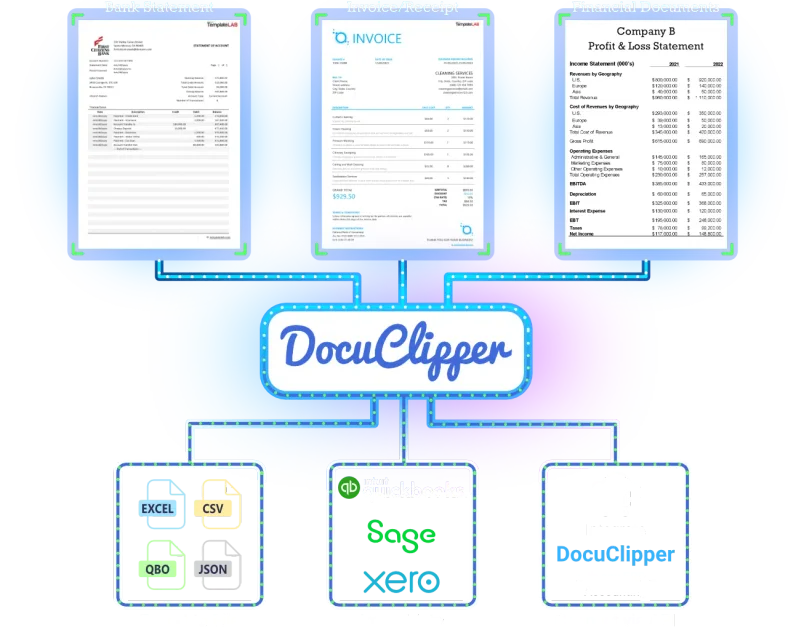
DocuClipper is a financial document automation platform for extracting data from bank statements, invoices, receipts, checks, and tax forms. It is designed to turn PDFs and images into structured output that can be reviewed, analyzed, and exported into accounting or spreadsheet tools.
The product combines OCR, parsing, and workflow automation in one system. Its site emphasizes high field-level accuracy, support for many common financial document types, and direct export paths to Excel, QuickBooks, and Xero, with additional API and webhook options for custom pipelines.
Turn bank statements, invoices, receipts, checks, and tax forms into structured records without building templates for each format.
Process scanned images and digital PDFs, including bulk invoice and receipt workflows, with line items, dates, vendors, amounts, and transactions captured from the source files.
Export extracted data to Excel, CSV, QuickBooks, or Xero, and use Google Sheets, Google Drive, API, or webhooks for connected workflows.
Use reconciliation and closing-balance validation on bank statement workflows to surface mismatches before data reaches accounting systems.
Analyze cash flow, flow of funds, fraud, and anomaly patterns after extraction for lending, audit, and forensic workflows.
Use the Agent API with PAT authentication, presigned uploads, job creation, and webhook notifications for custom integrations.
Bookkeepers and accounting teams can extract transactions from bank statements and push them into Excel, QuickBooks, or Xero without rekeying every line manually.
AP teams can process invoices and receipts in bulk, capturing line items, totals, and vendor details for downstream review or export.
Lending, underwriting, and fraud teams can use extracted bank data to review cash flow, verify income, and flag unusual patterns faster than manual review.
Audit and forensic teams can trace transactions, examine flows of funds, and organize large statement sets into structured data for investigation.
Developers and operations teams can automate document ingestion with the Agent API, webhooks, and direct file upload flows.
DocuClipper is a financial document automation platform that extracts structured data from bank statements, invoices, receipts, checks, and tax forms, then exports the results to Excel, CSV, QuickBooks, or Xero.
The site states that DocuClipper delivers 99.9% field-level accuracy across any bank, any format, and says bank statement extraction is validated against the closing balance so discrepancies are caught before export.
DocuClipper supports bank statements, credit card statements, invoices, receipts, checks, W-2s, 1099s, K-1s, and brokerage statements.
DocuClipper connects directly to QuickBooks Online and Xero, and its site also lists Excel, Google Sheets, Google Drive, API, and webhooks as part of the workflow options.
The pricing page says there is a 14-day free trial with no credit card required, and the plans are designed around document volume with unlimited users included.
I dati sul traffico sono solo a scopo di riferimento.

小艺 is Huawei’s AI smart assistant for Q&A, writing, document reading, code help, image recognition, and file drag-and-drop.
Immersive Translate is a bilingual AI translation tool and browser extension for websites, PDFs, subtitles, meetings, images, and comics with privacy-focused translation.

Prosed turns creator content into a publish-ready non-fiction book, with manuscript assembly, chapter review, editorial review, and PDF, ePub, or DOCX export.

CaptivateIQ is sales commission and sales planning software for incentive compensation, quota and territory planning, reporting, and payout workflows. SmartGrid models plans and calculates commissions in real time.

JustPaid is an AI revenue operations platform for billing, invoicing, collections, and accounts receivable. Automate invoice workflows, payment tracking, and reconciliation across connected systems.

Quanta provides SaaS accounting services backed by software that keeps financial work traceable and current. It helps finance teams close faster, explain changes, and monitor key metrics in real time.