PopPop AI icon

PopPop AI

Rivendica

PopPop AI is a set of free web-based AI tools for text to speech, vocal removal, sound effects, and 3D creation. It helps creators generate narration, separate vocals from songs, and build 3D assets without installing software.

PopPop AI

Overview

PopPop AI is a collection of free online AI tools for audio, video, and 3D creation. The site’s main offerings include text to speech, vocal removal, song cover generation, sound effects, and a 3D suite called Vita3D.

Its text-to-speech tools convert typed text into lifelike speech with multiple languages, accents, voices, and basic delivery controls such as speed and pitch. The vocal remover separates vocals and instrumentals from uploaded files or supported URLs, while Vita3D covers tasks from model generation to animation and motion capture.

The site positions its core tools as easy to use in a browser, with no login and no software installation for the web tools. A separate Windows and Mac TTS app is also promoted, but the available source material only confirms a free trial period and the promise of bulk document conversion, not a full pricing structure.

Core features

Text to speech with multiple languages

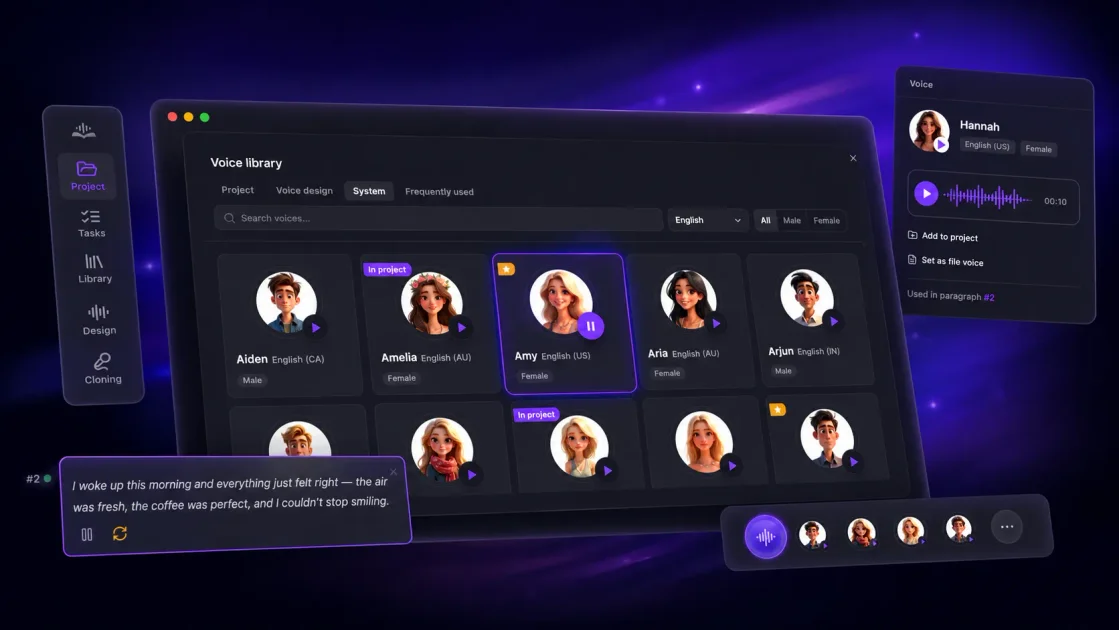
Turn written text into speech with selectable AI voices and language variants. The page shows many voices across languages and accents, including English, Chinese, French, German, Hindi, Japanese, Korean, Portuguese, and more.

Voice customization controls

Adjust speech delivery with controls for pitch and speed, plus tone options such as Cheerful, Hopeful, Excited, and Friendly on the text-to-speech page.

Vocal and instrumental separation

Separate vocals from songs or other audio sources to produce instrumental or acapella-style tracks. The vocal remover page frames the tool around removing vocals or instrumentals from a song.

File and URL input options

Import audio or video by file upload or URL. The vocal remover supports drag-and-drop, pasted links, and direct link processing for more than 1,000 sites.

Vita3D 3D creation workflow

Use the site’s 3D creation suite to generate models from text or images, apply textures, auto-rig characters, generate animations from prompts, and capture motion.

Browser-based access

Access the web tools without sign-in or software installation, as described on the home, text-to-speech, and vocal remover pages.

Common use cases

  • Narration and voiceover production

    Create narration for stories, podcasts, explainers, and voiceovers by typing text, choosing a voice, and adjusting basic delivery settings.

  • Music editing and karaoke

    Remove vocals from songs to make karaoke tracks, backing tracks, or acapella-style stems for practice and remixing.

  • Creative audio experiments

    Generate AI covers or sound effects for creative audio and video projects, using the site’s cover and SFX tools as part of a production workflow.

  • 3D asset and animation workflows

    Produce 3D assets, character rigs, animations, and motion-captured movement through Vita3D for end-to-end 3D content creation.

  • Desktop text-to-speech batches

    Process full documents in bulk with the Windows or Mac TTS app when a desktop workflow is preferred over the browser version.

Pros and Cons

Pros

  • Multiple tools are available under one domain, spanning text to speech, vocal removal, sound effects, and 3D creation.
  • The web tools are described as free, browser-based, and usable without sign-in or software installation.
  • The vocal remover supports both uploads and pasted URLs, including links from many popular sites.
  • The text-to-speech page offers multiple languages, accents, and voice options with adjustable speed and pitch.
  • The site provides practical workflows and FAQ guidance for common tasks such as karaoke tracks, remixes, voiceovers, and document narration.

Cons

  • The pricing page is unavailable, so there is no published plan table or confirmed subscription structure in the source.
  • Some feature pages are only partially covered in the collected evidence, so details for song covers, sound effects, and the desktop TTS app remain limited.
  • The vocal remover notes that separation is not necessarily perfect in every case, which is consistent with the nature of vocal isolation tools.

FAQ

What does PopPop AI do?

PopPop AI offers a web-based text-to-speech tool that converts text into speech using realistic AI voices. The source also highlights a separate Windows and Mac TTS app for converting full documents in bulk, but the site does not provide a detailed feature breakdown for that app here.

Is PopPop AI free?

Yes. The text-to-speech and vocal remover pages describe the tools as free to use, and the site highlights no login and no software installation for the web tools. The pricing page itself is a not-found page, so there is no confirmed pricing table to cite.

What file and link types does the vocal remover support?

The vocal remover page says it accepts pasted URLs or uploaded audio/video files, supports links from over 1,000 sites including YouTube, TikTok, and X, and works with common audio and video formats such as MP3, WAV, FLAC, MP4, MKV, and MOV.

How does the workflow work?

For vocal removal, the site says you can upload a file or paste a URL, start the removal process, and then save the separated vocal and instrumental tracks. For text to speech, the page instructs users to choose a language, select a voice, enter text, adjust settings, and start converting.

What platforms does PopPop AI support?

The source says the web tools work in major browsers and on Windows, macOS, Android, and iOS. The vocal remover page explicitly lists Chrome, Firefox, Safari, and Edge as supported browsers.

Quick Facts

Product
PopPop AI
Category
AI audio and 3D tools
Primary tools
Text to speech, vocal remover, cover generator, sound effects, Vita3D
Platform
Web; desktop TTS app for Windows and Mac
Access
Free web tools with no login
Domain
poppop.ai