

Infinite canvas workspace
AgentGrid uses an infinite 2D canvas so you can pan, zoom, and arrange multiple agents and support panes in one visual workspace.

AgentGrid is a desktop app for managing multiple AI agents on one infinite canvas, with terminals, browsers, notes and code tools in one workspace.
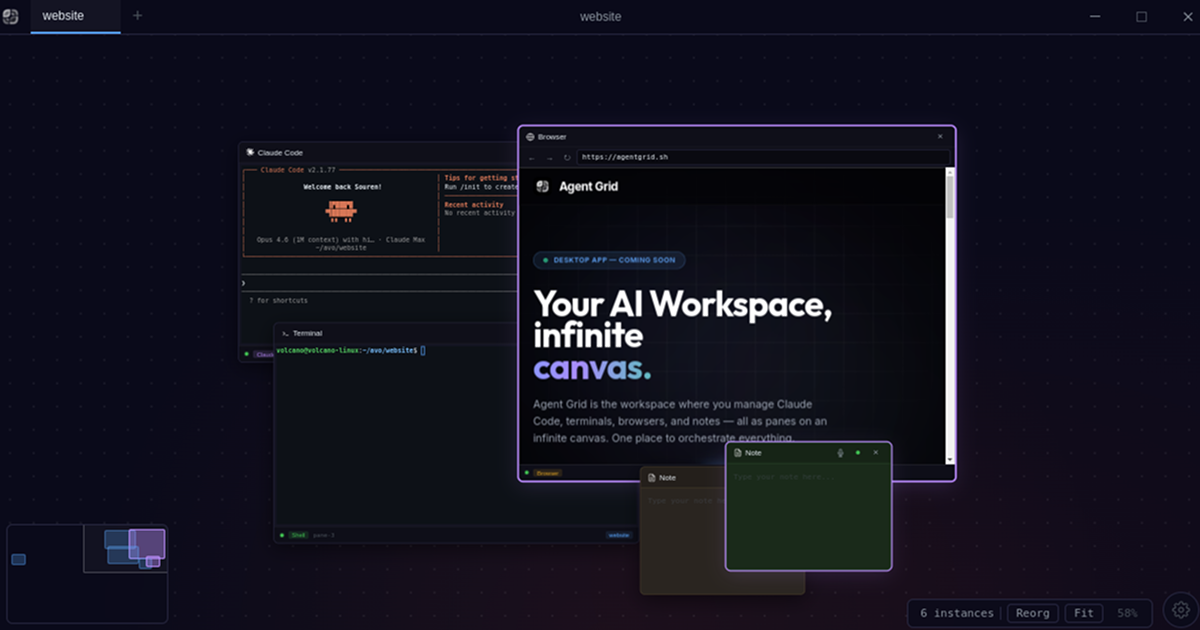
AgentGrid is a desktop app for managing multiple AI agent instances on a single infinite canvas. It is designed around visual orchestration: each agent, terminal, browser, note, editor, or source-control view appears as a pane that you can place, connect, and revisit inside one project-bound workspace.
The product is available on macOS, Windows, and Linux, and the site positions it for developers who run more than one coding agent at a time. The docs emphasize master/worker workflows, where a coordinating agent can delegate tasks to workers, review progress, and continue the work without forcing everything into a single chat thread.
AgentGrid uses an infinite 2D canvas so you can pan, zoom, and arrange multiple agents and support panes in one visual workspace.
The app supports master/worker style delegation, where one agent can spawn workers, read their conversations, and send follow-up instructions.
Agents can see notes, terminal output, and other panes in the same project, which helps them work with the surrounding context instead of isolated chats.
You can launch and compare supported coding agents side by side, with Claude Code and Codex available now and OpenCode listed as coming soon.
Developer tools such as terminal, VS Code, git, and Chromium/DevTools can sit beside the active agent panes for hands-on development work.
AgentGrid tracks provider usage limits and reset times, and shows warnings before work is interrupted by a limit.
Use AgentGrid to split a coding task into planning, implementation, testing, and review. The canvas keeps the master conversation and worker panes visible while the work moves forward.
Run Claude Code and Codex side by side to compare outputs, hand off work between providers, or continue after one provider hits a limit.
Keep terminals, browsers, notes, and source-control panes next to the agents that depend on them so you can inspect logs, verify changes, and coordinate edits without switching apps constantly.
Open the same project on desktop or mobile beta to continue work with the same canvas layout on another device.
Use the app’s persistence and resume behavior to reopen a project after a restart or update without losing the workspace layout or active sessions.
AgentGrid is a desktop app for macOS, Windows, and Linux. The docs describe it as an infinite canvas workspace where AI agents, terminals, browsers, code editors, notes, and other panes can live side by side.
The source confirms support for Claude Code and Codex now, with OpenCode coming next week. The docs also mention Antigravity (agy) panes and a supported CLI setup flow.
The download page lists a free plan for trying AgentGrid on your own machine, plus an early-adopter Pro plan. Pro includes unlimited canvases, cloud sync across machines, local and cloud agents, and access to planned features as they ship.
The docs and changelog indicate that AgentGrid is intended for developers and teams who manage multiple agent sessions, often using a master/worker workflow. It also supports terminals, browsers, notes, source control, and developer tools alongside agents.
The docs describe spaces as project-bound tabs, canvases as infinite 2D surfaces, and panes as individual agents or tools. That means the app is designed around orchestrating work visually rather than keeping everything in a single chat thread.
트래픽 데이터는 참고용으로만 확인하세요.
아직 트래픽 분석 데이터가 없습니다.

AI Magicx is a unified AI workspace for chat, image, video, voice, music, email and developer tasks, helping teams and creators manage multiple models in one place.

Paper is a design tool that connects canvas, code, and AI agents so teams can create, share, and ship work in one workflow. Includes desktop app and MCP access.

Orca is an Agent Development Environment for shipping with coding agents, running multiple CLI agents in parallel across isolated worktrees, with desktop and mobile workflows.

Firebase Studio is a web-based workspace for full-stack app development with Gemini-assisted coding, app previews, cloud emulators, collaboration, and browser deployment.

TakeCareOS is a web platform for home care, disability, and aged care agencies, with rostering, billing, compliance, and AI admin tools.

Speakflow online teleprompter for writing and organizing scripts, voice scrolling, team collaboration, and cross-device syncing. Free and paid plans available.