

Editable canvas output
Generate fully editable designs on a real canvas rather than a flat image output. The product emphasizes that every element can be adjusted after generation.

Moda is an AI design tool for editable slides, social posts, documents, PDFs and diagrams. Create on-brand assets from source material, with every element editable.
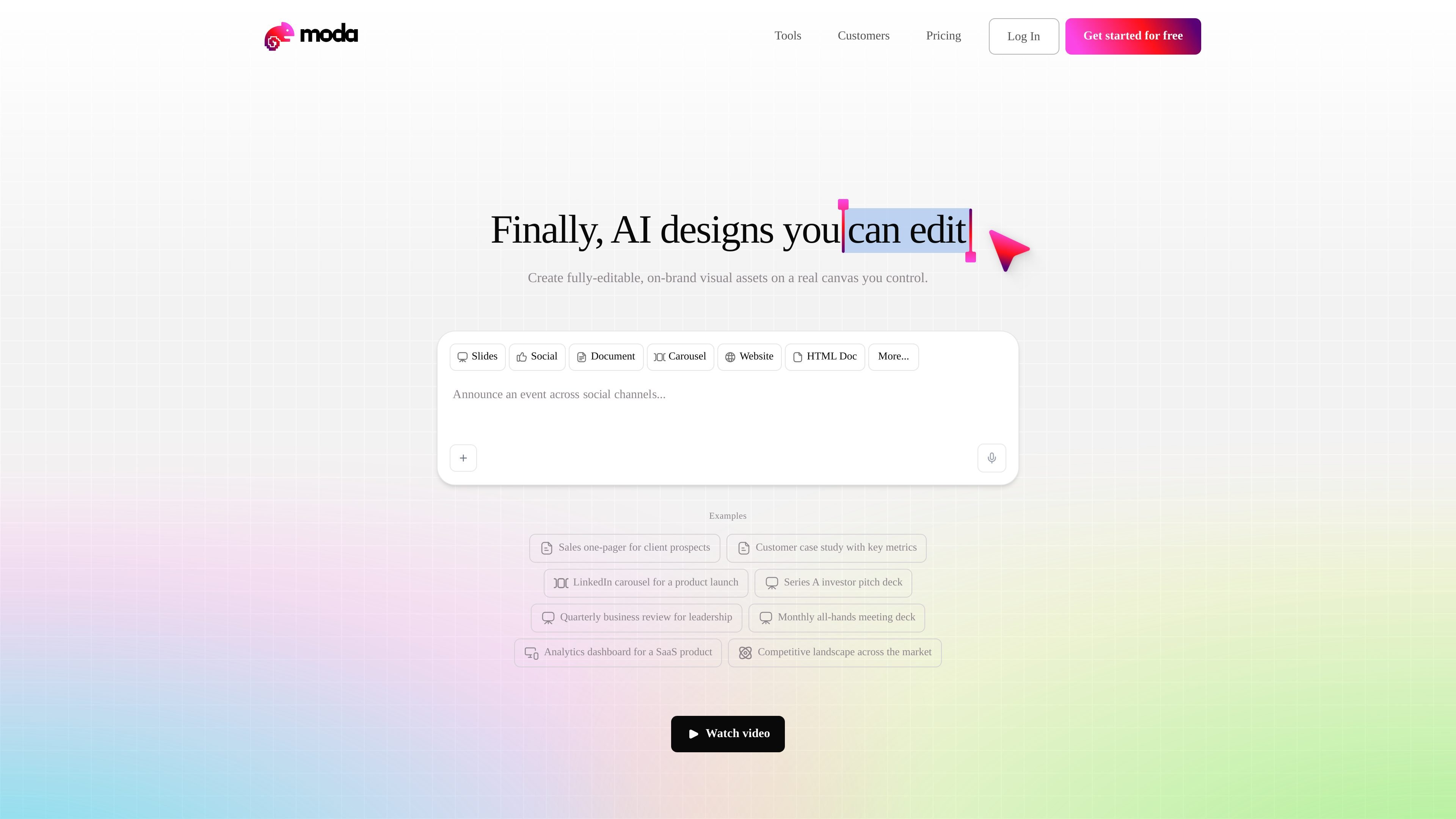
Moda is an AI design tool for creating editable visual assets on a real canvas. The site positions it for work that needs both speed and control: instead of producing static AI images, it generates slides, social posts, documents, PDFs, diagrams, charts, and related marketing or internal materials that can be revised element by element.
The product is aimed at teams that need branded output without handing every request to a designer or agency. Case studies show go-to-market teams using Moda to turn transcripts, notes, and outlines into polished drafts, then editing the result directly or through conversational prompts. Pricing pages also show a free tier, paid plans, real-time collaboration, and API/MCP access for higher-volume use.
Generate fully editable designs on a real canvas rather than a flat image output. The product emphasizes that every element can be adjusted after generation.
Create slides, social posts, documents, PDFs, diagrams, charts, visualizations, UI mockups, and motion graphics from a single product surface.
Use brand context, custom themes, and brand kits so outputs stay aligned to an organization's visual system. Higher tiers add shared brand management for larger teams.
Edit work directly or ask the AI to revise a layout conversationally. The case studies show teams using source transcripts and notes to produce first drafts, then making live changes as needed.
Work together in real time, share projects across teammates, and pool credits on paid plans. The pricing page also shows unlimited projects across plans.
Use the API and MCP on paid plans for up to 3, 10, or 15 concurrent tasks depending on tier. The site also mentions deep research access in beta on the Free plan by request.
Turn meeting transcripts, notes, or rough outlines into a polished deck for a prospect, customer, or internal review. The case studies show this workflow being used to create enterprise-ready collateral quickly and then correct slides during live conversations.
Build one-pagers, ads, carousels, and other on-brand campaign assets for marketing or ABM work. FERMÀT’s case study shows the product being used for content-driven lead generation and fast iteration without contractor handoffs.
Create internal documents, agendas, and employee-facing materials that need to look designed without spending time in a separate design tool. The homepage examples and case studies both point to this kind of everyday business communication.
Use the canvas to produce charts, dashboards, and visual explanations for leadership updates or quarterly business reviews. The homepage examples include analytics and quarterly reporting-style materials, which fit this use case.
Start from remixable example files when a team wants a quick template for a known format, then adapt the design and copy to match the current topic or campaign.
Moda is designed for creating editable visual assets such as slides, social posts, PDFs, diagrams, documents, and HTML-style layouts. It works well when a team needs to turn source material into a design that can still be revised element by element.
The pricing page describes a free plan and paid Pro and Ultra plans. Free includes 1,500 AI credits per seat each month, while paid plans increase the included credits and add higher-capacity AI usage and team features.
Yes. The pricing page says all plans include unlimited projects and real-time collaboration. The case studies also show teams using Moda together on GTM collateral and live edits.
Moda uses AI credits for actions such as generating designs, editing layouts, removing backgrounds, and creating images. The page notes that more complex tasks consume more credits and that paid plans bill extra usage at a metered rate after included credits are used.
The source pages do not describe a public template library or a complete integration list. They do show API and MCP access on paid plans, plus browser-based design workflows and remixable example files.

SlideSpeak is an AI presentation maker that turns prompts and source files into editable PowerPoint decks. It also redesigns slides, translates, summarizes, and supports branding and video presentations.

小艺 is Huawei’s AI smart assistant for Q&A, writing, document reading, code help, image recognition, and file drag-and-drop.

Paper is a design tool that connects canvas, code, and AI agents so teams can create, share, and ship work in one workflow. Includes desktop app and MCP access.

Superside is an AI-powered creative service for enterprise and in-house teams, with global talent, AI-first workflows, and subscription-based support.

Arcwise is an AI product for detecting meaningful metric changes and explaining them with data-grounded analysis. It turns warehouse and business-context data into decision-ready reports in app, docs, or slides.
ChartAI is a web-based AI tool for charts, diagrams, infographics, and visuals for presentations, papers, and projects.