

Selected-text actions
Apply saved AI prompts directly to highlighted text, so the writing workflow stays inside the app where the text already lives.

TypeBoost is a macOS AI writing toolkit for editing, translating, and rewriting selected text in any app without copy-pasting.
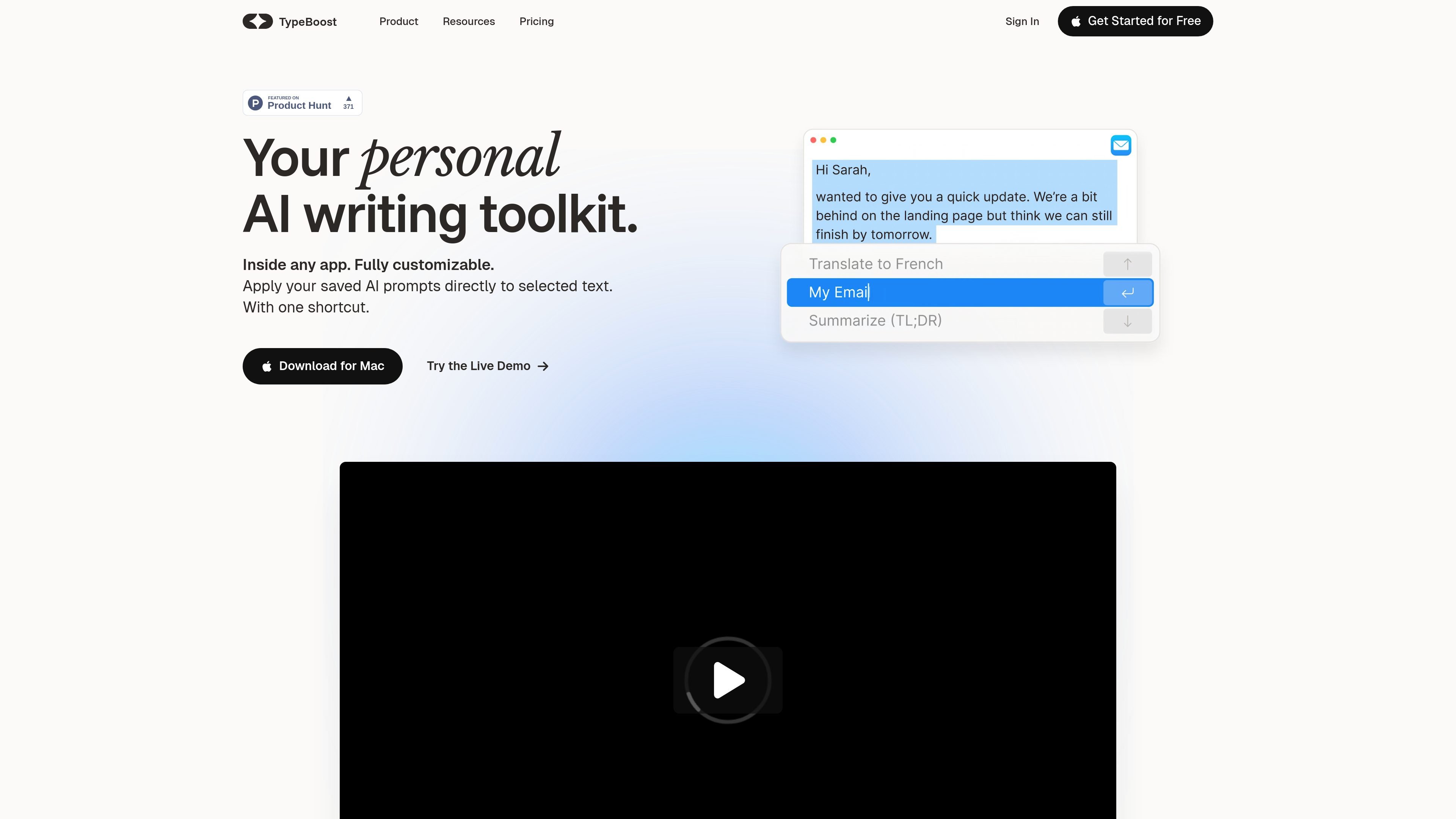
TypeBoost is a personal AI writing toolkit for macOS that applies custom prompts to selected text inside the app you are already using. The product is built around a simple workflow: select text, trigger the shortcut, choose an action, and get a rewritten result without copy-pasting into another tool.
The homepage positions TypeBoost as a way to stop re-explaining the same writing rules to AI and reuse them as saved actions. The source highlights use cases such as improving emails, writing LinkedIn posts, translating text, cleaning up rough notes, and turning voice input into clearer writing.
Apply saved AI prompts directly to highlighted text, so the writing workflow stays inside the app where the text already lives.
Trigger actions from a shortcut shown in the demo flow, with control-space used as the example entry point.
Save prompts as reusable actions and customize them for specific writing tasks such as emails, LinkedIn posts, and translations.
Browse a prompt hub with templates for common jobs like improving writing, translating text, fixing grammar, and rewriting for a specific tone.
Use voice input and voice-to-text style prompts, including turning voice into clear text or to-do lists, as shown in the homepage examples.
Work with a range of editing and rewriting templates, including shortening text, formalizing copy, and applying frameworks such as PAS and AIDA.
Draft a message in your email client, then apply an improvement or personalization prompt without leaving the composer. The homepage explicitly shows an email demo and references outreach-style workflows.
Turn rough notes into a more readable LinkedIn post or social update. The source includes prompts for polishing LinkedIn posts, adding emojis, and rewriting build-in-public style posts.
Translate text while staying in the current page or app. The homepage testimonials specifically mention translating from French to English and into Bahasa without switching tabs.
Clean up messy copy by fixing spelling, grammar, tone, and clarity. The prompt hub includes templates for fixing spelling and grammar, improving writing, and shortening text.
Use voice input to capture ideas and then convert them into usable text formats, such as clear text or to-do lists. The homepage explicitly mentions voice input and voice-to-text style prompts.
Apply repeatable rewrite frameworks for marketing or structured copy, such as PAS, AIDA, plain language, SEO copy guidelines, or client proposals.
TypeBoost is presented as a macOS writing toolkit that lets you apply saved AI prompts to selected text inside an app. The source also mentions custom prompts, voice input, and a live demo that shows the basic select-text, shortcut, choose-prompt flow.
The source says TypeBoost works on macOS and can be used inside any app. It is designed to act on selected text without copy-pasting into another tool.
The homepage and prompt hub show writing tasks such as improving email, translating text, fixing spelling and grammar, shortening text, making text formal, and polishing LinkedIn posts. It also shows prompts for summaries, sales copy, plain-language rewriting, and voice-to-text cleanup.
The source does not provide pricing details. The pricing page currently returns a 404, so there is no confirmed public pricing information in the supplied evidence.
The support page invites users to contact support at [email protected]. It says users can reach out with problems, questions, or ideas.

讯飞写作 is an AI writing assistant for office, news, marketing and official content. Import audio, video, Word, images and PPT to draft faster.

Altered is an AI voice changer and voice content creation platform for media production and live voice use. It combines voice morphing, text-to-speech, transcription, translation, cloning, and editing in one application.

Subtitle Translate AI is a browser-based subtitle translation tool for SRT and related files. Translate subtitles into 100+ languages while preserving timing, formatting, and context.

讯飞会议 cloud video conferencing for enterprise collaboration, with video meetings, AI transcription and translation, and automatic meeting notes. Public and private cloud.

迅捷AI写作 is an online AI writing tool for papers, novels, office docs and content creation, with scenario templates, online document writing and multi-format export.

Nily AI is a browser-based AI assistant platform with 20+ models and tools for chat, writing, PDFs, email, images, and web page analysis. 7-day free trial.