

Parallel agent execution
Superset is built to launch multiple coding agents on the same machine so you can keep work moving across tasks instead of waiting on a single run to finish.

Superset is a desktop tool for running multiple AI coding agents in parallel on your own machine. Separate work in isolated Git worktrees, review changes, and keep tasks moving.
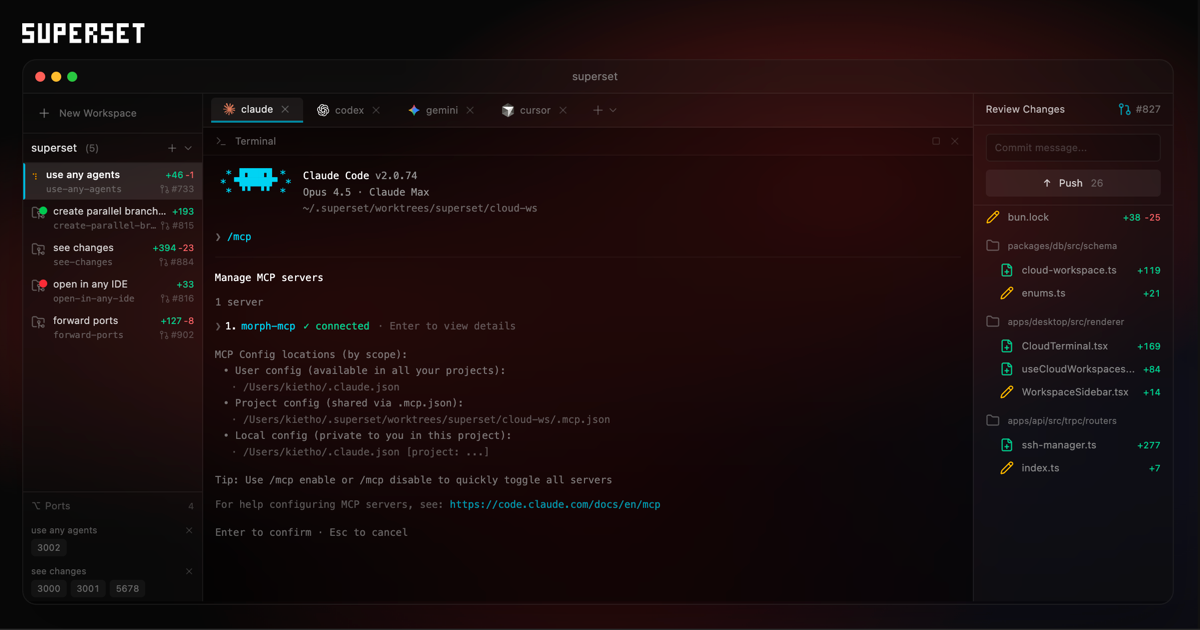
Superset is a desktop product for running multiple AI coding agents in parallel on your own machine. The site positions it as a way to start new coding tasks while a current agent is still working, so you can keep several branches of work moving at once.
The product centers on isolated Git worktrees, agent compatibility, and a review flow that shows changes inside Superset. The site also indicates that users can open worktrees in external IDEs, forward ports, and manage local or remote workspaces depending on plan.
Pricing on the site is organized into Free, Pro, and Enterprise tiers. Free is aimed at individuals getting started, Pro adds more team-oriented capabilities, and Enterprise offers custom pricing with security and support features such as SSO/SAML, audit logs, and SLAs.
Superset is built to launch multiple coding agents on the same machine so you can keep work moving across tasks instead of waiting on a single run to finish.
Each agent runs in its own isolated Git worktree, which keeps changes separated and helps avoid merge conflicts while work is in progress.
The product is agent-agnostic and is shown working with CLI-based tools such as Claude Code, OpenCode, Cursor, Copilot, Amp, Gemini, and Codex.
The interface shows worktrees, changes, and review flows inside Superset, so you can inspect progress without leaving the workspace.
Superset can open worktrees in external editors and terminal environments, including VS Code, Cursor, Xcode, JetBrains IDEs, and generic terminals.
The pricing page includes collaboration-related tiers with remote workspaces, Linear integration, Slack integration, and team collaboration features for paid plans.
Use Superset when you want to assign several coding tasks at once, such as feature work, bug fixes, and refactors, and let them run in parallel instead of serially.
Use the isolated worktree model when you need separate branches for different agents and want to avoid one task overwriting another task’s changes.
Use the review and change-view workflow when you need to compare agent output before merging it back into the main branch.
Use the IDE-opening flow when your team prefers to inspect or continue work in an editor such as VS Code, Cursor, Xcode, JetBrains IDEs, or a terminal environment.
Use the plan and integration mix when you need a team-oriented setup with remote workspaces, Linear, Slack, or security controls such as SSO/SAML and audit logs.
Yes. The pricing page shows a Free plan for individuals getting started, with a download link for the app.
Superset offers Pro on a per-user monthly basis, billed yearly, and Enterprise with custom pricing.
The Enterprise page asks organizations to reach out to discuss the right setup for their team.
The pricing page lists desktop app, local workspaces, GitHub integration, and a CLI marked as coming soon on Free; Pro adds remote workspaces, Linear integration, and a mobile app marked coming soon.
The site presents Superset as a product for running parallel coding agents and shows support for CLI-based agents such as Claude Code, OpenCode, Cursor, Copilot, Amp, Gemini, and Codex in the rendered home page text.

Firebase Studio is a web-based workspace for full-stack app development with Gemini-assisted coding, app previews, cloud emulators, collaboration, and browser deployment.

Orca is an Agent Development Environment for shipping with coding agents, running multiple CLI agents in parallel across isolated worktrees, with desktop and mobile workflows.

AI Magicx is a unified AI workspace for chat, image, video, voice, music, email and developer tasks, helping teams and creators manage multiple models in one place.

Paper is a design tool that connects canvas, code, and AI agents so teams can create, share, and ship work in one workflow. Includes desktop app and MCP access.

阶跃AI is a personal efficiency assistant from 阶跃星辰 for knowledge search, writing, coding, and daily automation. Download on desktop and mobile, and trigger web, files, and reminders by voice.

TakeCareOS is a web platform for home care, disability, and aged care agencies, with rostering, billing, compliance, and AI admin tools.