

Problem-to-requirements workflow
Describe the workflow or problem in plain English, then let Durable investigate your systems and turn that into concrete requirements before code is generated.

Durable is an AI software platform that turns plain-English process descriptions into production-ready automations and custom software for teams, without writing code.
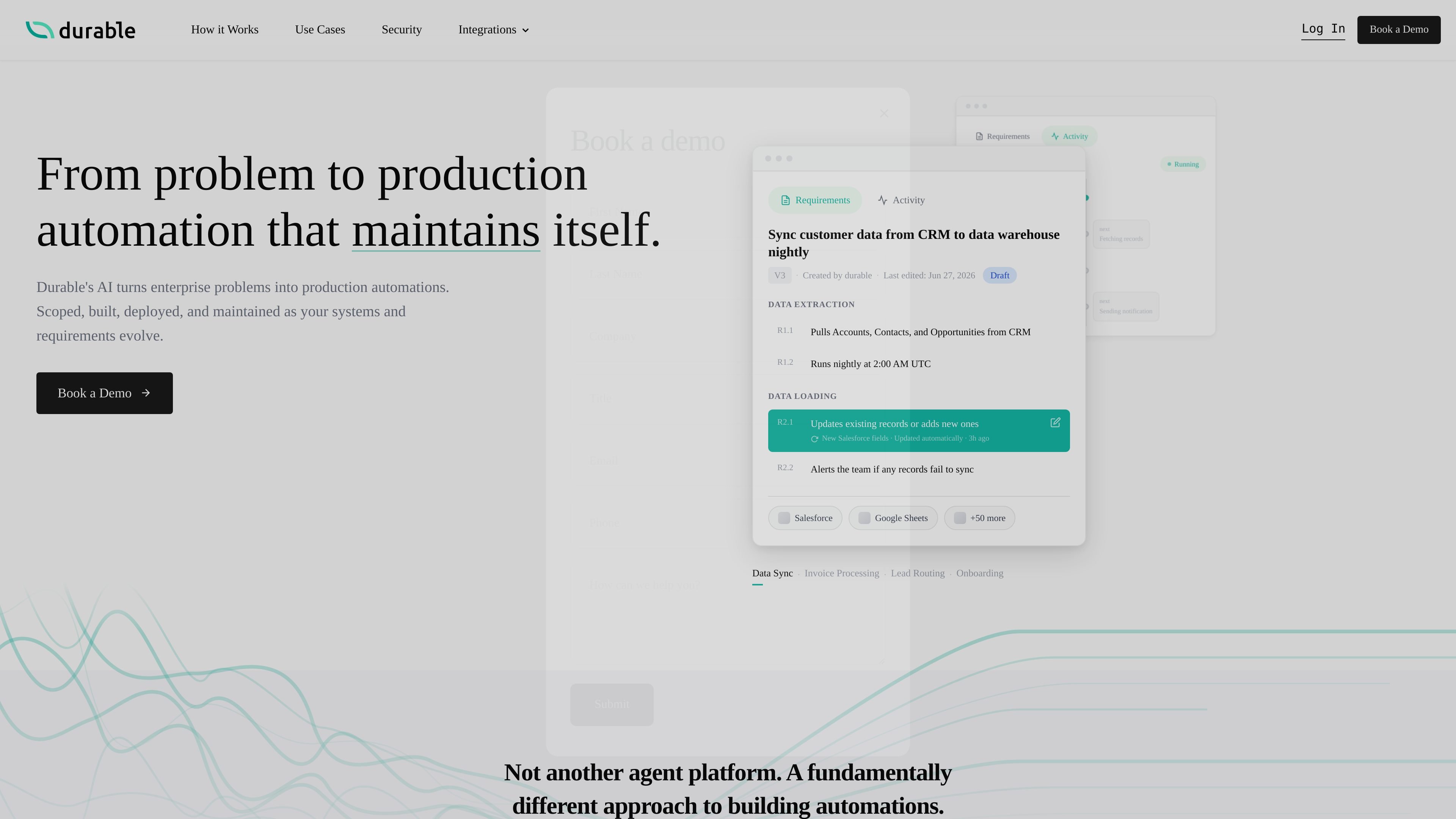
Durable is an AI software platform that turns plain-language problem descriptions into production-ready automations and custom software. Its site positions the product as a way to go from idea to deployment without writing code yourself, while still producing actual code rather than a chain of prompts or workflow blocks.
The product starts by investigating the systems involved, asking clarifying questions, and drafting structured requirements that become the source of truth. Durable then builds, tests, deploys, and maintains the automation, with monitoring, version history, and change approvals designed for teams that need software to stay aligned as requirements evolve.
Describe the workflow or problem in plain English, then let Durable investigate your systems and turn that into concrete requirements before code is generated.
Durable presents requirements as readable source of truth, with editable statements and version history so teams can review what the automation should do.
The product emphasizes actual production code rather than agent chains or prompt wrappers, with deterministic logic where possible and AI used only where it adds value.
Durable supports one-click deployment, with the system handling testing and deployment behind the scenes after requirements are approved.
The workflow monitor shows run state, recent activity, and fixes, while the product describes automatic error detection and API compatibility monitoring.
The integrations library includes production-ready connectors for tools such as Salesforce, Slack, Google Sheets, GitHub, Google Drive, HubSpot, Jira, QuickBooks, and OpenAI.
Build automations that move and transform business data between systems, such as syncing CRM records into a warehouse on a schedule and handling field mapping or failure alerts.
Create recurring business processes that connect multiple SaaS tools, including lead routing, invoice processing, onboarding, and notification steps shown on the home page.
Implement automations that need human review, since Durable keeps requirements readable and lets teams request changes in plain English with approvals and version history.
Use Durable when the workflow depends on internal systems or custom objects that need discovery first, since the product describes investigating live schemas, APIs, and edge cases before building.
Adopt the platform for enterprise teams that need integrations, auditability, and controls like SSO/SAML, RBAC, and monitoring for production operations.
Durable is designed to start from a natural-language description of a problem, then ask clarifying questions, inspect connected systems, and turn that into structured requirements and production code before deployment.
The site describes outputs as plain-English requirements, versioned code, deployment to production, and an activity feed or workflow monitor that shows what the automation is doing.
Durable presents one-click deployment, version history, approvals, and a requirement-editing workflow so teams can request changes in plain English instead of rewriting the automation manually.
The site does not list a standard pricing page. A 404 on /pricing and repeated “Book a Demo” calls suggest sales-led enterprise pricing rather than self-serve checkout.
Durable says it can connect to any system with an API and highlights integrations with tools such as Salesforce, Snowflake-related workflows, Slack, Google Sheets, GitHub, HubSpot, Gmail, Jira, QuickBooks, and more.

EZsite AI is an AI website builder that turns a URL into a fullstack React or Vue.js app with hosting, custom domains, code export, and backend features.

Framer is an AI website builder for professional sites. It helps teams design, manage CMS content, optimize SEO, collaborate, and publish from a single no-code workflow.

Softr is a no-code platform for business apps, portals, and internal tools with AI-assisted creation, visual editing, and data connections.

Orca is an Agent Development Environment for shipping with coding agents, running multiple CLI agents in parallel across isolated worktrees, with desktop and mobile workflows.

Firebase Studio is a web-based workspace for full-stack app development with Gemini-assisted coding, app previews, cloud emulators, collaboration, and browser deployment.

AI Magicx is a unified AI workspace for chat, image, video, voice, music, email and developer tasks, helping teams and creators manage multiple models in one place.