

AI one-click diagram generation
The homepage clearly states that 妙办画板 combines AI creation, mind maps, analysis models, brainstorming, and other capabilities, supporting automatic generation of flowcharts or mind maps after entering prompts.

妙办画板 is an online diagramming tool for flowcharts, mind maps, org charts and prototypes, with AI creation, template editing, online collaboration and会员 export benefits.
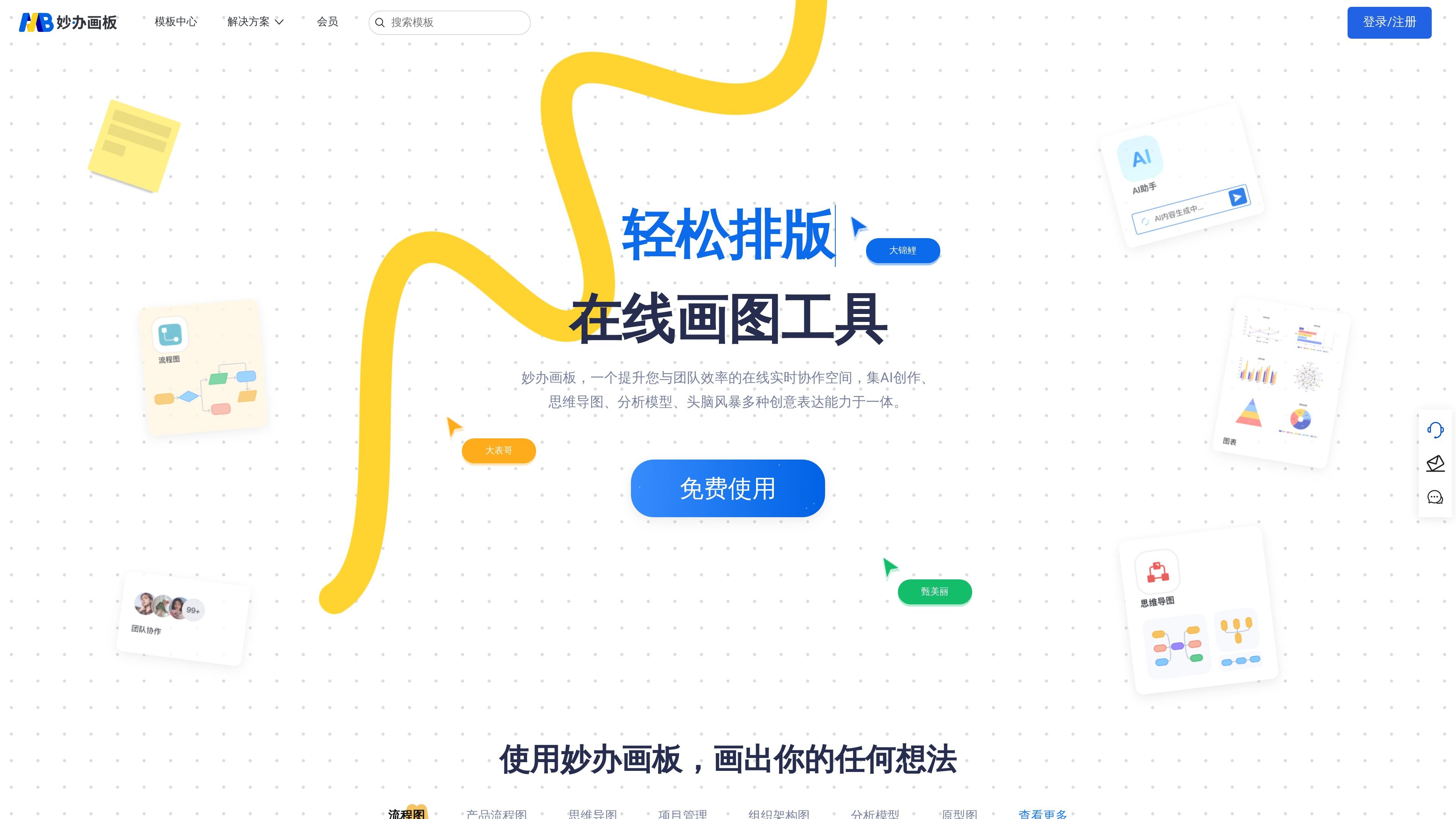
妙办画板 is an online drawing tool for users who need to quickly create flowcharts, mind maps, org charts, relationship diagrams, structure diagrams, analysis models, and prototype diagrams. The homepage describes it as an “online real-time collaboration space” and places AI creation, template editing, and team collaboration in the same workflow.
From the visible information on the page, the product provides a free use entry point, a template center, and membership services. Users can start from templates or prompts, then continue editing with drag-and-drop, modifications, and smart color matching; the membership page also adds benefits such as watermark-free export, multi-format export, and a higher number of editable files.
The website also provides a template search page and a membership benefits page, showing that 妙办画板 is not just a single canvas tool, but also includes supporting functions such as template browsing, search, and membership management.
The homepage clearly states that 妙办画板 combines AI creation, mind maps, analysis models, brainstorming, and other capabilities, supporting automatic generation of flowcharts or mind maps after entering prompts.
The page copy mentions that you can “simply drag and drop, customize and edit,” and use smart color matching to adjust diagrams, making it suitable for refining generated results.
The template center shows that 妙办画板 has 10 major categories in total, and flowchart, model, and mind map templates can be edited online for free, making it easy to start from ready-made templates.
The membership page shows that members support watermark-free export and multi-format export, while the number of editable files increases from 5 in the free version to unlimited.
Both the homepage and the membership page emphasize an “online real-time collaboration space” and collaboration capabilities, making it suitable for project communication and multi-person content organization.
The template search page provides site-wide search and trending search entry points, and is labeled “0 templates, updated daily,” indicating that the product includes template retrieval and continuously updated content entry points.
When you need to quickly organize a requirement, an idea, or a process description into a structured diagram, you can use AI generation first and then fine-tune it with drag-and-drop.
Product, design, or project teams can start from the template center to quickly build flowcharts, org charts, project management diagrams, or prototype diagrams, and then modify them according to the team’s actual needs.
When multiple people need to work through a solution together, you can use the online real-time collaboration space highlighted on the page to communicate, edit, and summarize content on the same canvas.
If you often need to create mind maps, analysis models, or brainstorming records, you can use 妙办画板 to place scattered information into a single editable canvas.
When you need to export deliverables for a solution, the watermark-free export and multi-format export capabilities listed on the membership page are more suitable for output-focused scenarios.
妙办画板 supports free use, and the homepage also provides member login/sign-up entry points; the membership page further distinguishes between Free, Personal, and Team plans, and states that members can get watermark-free export, multi-format export, more editable files, and member-exclusive content templates.
Based on the page information, 妙办画板 offers online diagramming, template search, and a membership benefits page, making it suitable for people who need to create flowcharts, mind maps, org charts, analysis models, and prototype diagrams.
The membership page clearly mentions watermark-free export and multi-format export, but the page does not further list specific format names.
The membership page shows comparison dimensions such as creation, collaboration, management, resources, service, and support, and the homepage also emphasizes online real-time collaboration, but the page does not expand on the specific collaboration mechanism.
The template center page states that 妙办画板 has 10 major categories in total, templates can be edited online for free, and it is described as being updated daily.

Paper is a design tool that connects canvas, code, and AI agents so teams can create, share, and ship work in one workflow. Includes desktop app and MCP access.

Superside is an AI-powered creative service for enterprise and in-house teams, with global talent, AI-first workflows, and subscription-based support.

My QR Code is a web-based QR code generator for links, vCards, files and more, with design customization, export formats and scan tracking.
ChartAI is a web-based AI tool for charts, diagrams, infographics, and visuals for presentations, papers, and projects.

Dropmagic is an AI Shopify store builder that creates branded storefronts from source products with AI copy, images and design. Launch faster without coding.

SlideSpeak is an AI presentation maker that turns prompts and source files into editable PowerPoint decks. It also redesigns slides, translates, summarizes, and supports branding and video presentations.