

Automatic surface detection
Upload an interior or exterior photo and the AI identifies paintable surfaces automatically, including walls, trim, doors, shutters, cabinets, siding, and brick.

Housepaint AI is a web and mobile paint color visualizer for interior and exterior home photos. Preview real paint colors on walls, cabinets, brick, doors, shutters, and siding before painting.
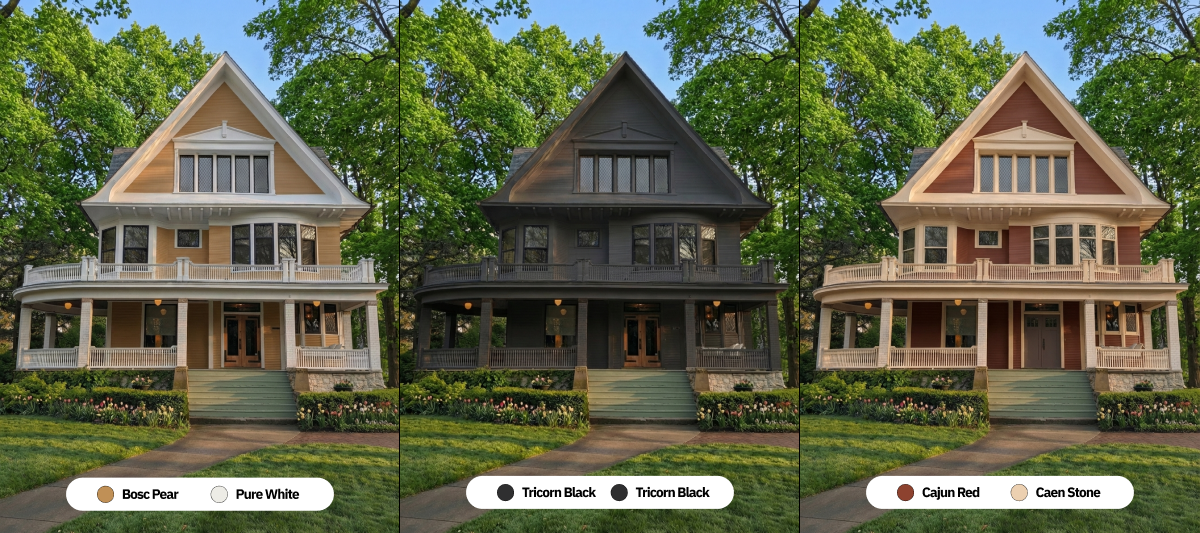
Housepaint AI is a paint color visualizer for interior and exterior home photos. It lets you upload a photo, detect paintable surfaces automatically, and preview real paint colors from major brands before committing to a finish.
The site positions the product for homeowners, interior designers, and painting contractors who want to compare color options on walls, cabinets, brick, doors, shutters, siding, and other surfaces. It supports web use and a mobile app, and the homepage says new users receive 5 free credits to try the service.
Upload an interior or exterior photo and the AI identifies paintable surfaces automatically, including walls, trim, doors, shutters, cabinets, siding, and brick.
Preview colors on realistic room and exterior photos without manual masking, which reduces setup compared with traditional paint visualizers.
Browse more than 19,800 colors from Sherwin-Williams, Benjamin Moore, Behr, PPG, Farrow & Ball, Valspar, and Dunn-Edwards, matched to official specifications.
Compare options with before-and-after sliders and side-by-side sharing so you can review multiple schemes before choosing one.
Share a color option through a link that other people can open without installing the app or creating an account.
Use the web app or the mobile app for iPhone, iPad, and Android, with projects synchronized across devices.
Upload a room photo, let the AI identify walls and trim, and compare wall colors before painting a living room, bedroom, or hallway.
Test painted brick, limewash, or solid color options on exterior facades or interior fireplaces while keeping texture and mortar lines visible.
Preview cabinet colors in kitchens or bathrooms while preserving countertops, backsplash, hardware, and shadow detail.
Evaluate front doors, shutters, and siding together so the color choice works with the rest of the home exterior.
Share a few options with a family member, client, or painter and compare them side by side before making a decision.
Housepaint AI works by uploading a photo of an interior or exterior space, letting the AI detect surfaces such as walls, trim, doors, shutters, cabinets, siding, and brick, then choosing a color to generate a preview in seconds.
The source states that Housepaint AI offers over 19,800 colors from Sherwin-Williams, Benjamin Moore, Behr, PPG, Farrow & Ball, Valspar, and Dunn-Edwards, matched to official specifications.
New users get 5 free credits to try the service with no credit card required. The source says image analysis costs 1 credit and repainting costs 2 credits, and there are no subscriptions or recurring fees.
Yes. The site says you can use photos from a smartphone, tablet, or camera, and that both interior and exterior photos work well. It recommends good natural lighting and capturing the full area you want to paint.
The product says its AI preserves lighting, shadows, and textures for realistic previews, but also recommends getting physical paint swatches before making a final purchase because digital displays can vary.

豆绘AI is an online AI image generation and editing platform for ecommerce and design, supporting white background, scene, interior rendering and post-processing.

AI HomeDesign is a web-based photo editing toolbox for real estate listings, with AI staging, item removal, day-to-dusk rendering, enhancement, and renovation tools. It is built for agents and other listing workflows that need editable, listing-ready images quickly.

AI Watermark Remover is a free online tool to remove watermarks from photos and videos with manual brush selection and no added output watermark.

Photoroom is an AI visual editing platform for e-commerce that removes backgrounds, creates product images, and prepares listings from phone, web app, or API workflows.

Upsampler is an AI platform for creating, editing and upscaling images and videos in one workspace. Pay per credit, full API access, commercial use included.

Nily AI is a browser-based AI assistant platform with 20+ models and tools for chat, writing, PDFs, email, images, and web page analysis. 7-day free trial.