

Old photo to video generation
Turns uploaded old photos into short AI-generated videos. The home page says the tool creates 5-second videos and supports motion prompts such as waving, walking, dancing, and turning around.

Animate Old Photos uses AI to animate and restore old photos, turning uploads into short videos with prompts, audio, and photo repair tools.
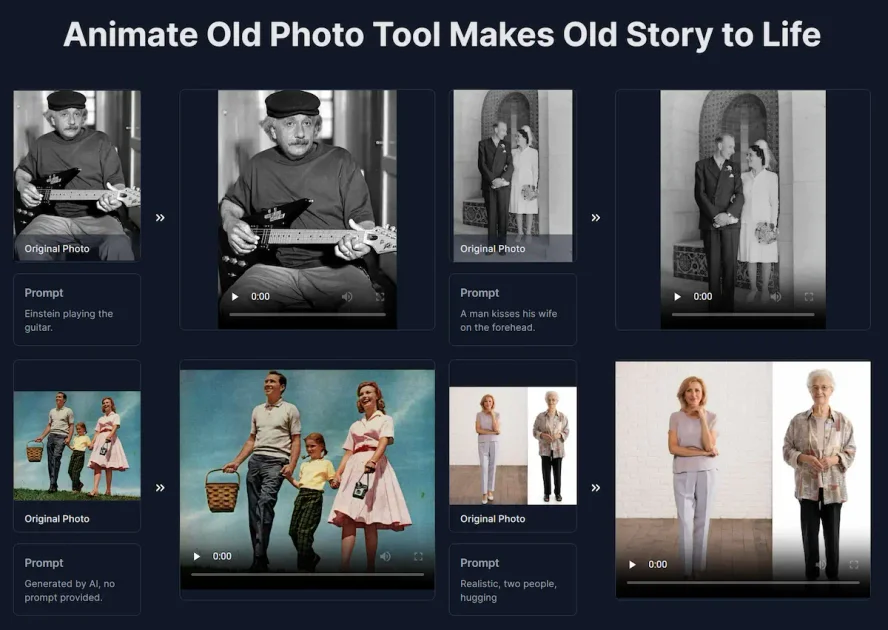
Animate Old Photos is an AI photo animation site that turns uploaded images into short videos, with optional prompts and audio. The home page also shows related workflows for restoring old photos and adding a loved one into a photo.
The product is aimed at people who want to turn family photos, memorial images, wedding pictures, or other old photographs into shareable visual keepsakes. The site says the animation workflow can be done in a few steps: upload a photo, add a prompt if desired, and download the result.
Turns uploaded old photos into short AI-generated videos. The home page says the tool creates 5-second videos and supports motion prompts such as waving, walking, dancing, and turning around.
Lets users optionally add a text prompt to steer the animation. If no prompt is entered, the site says the AI can generate one automatically; audio can also be enabled for speech, singing, or background music.
Includes a restoration workflow for old images. The site says it can colorize photos and repair damage, fading, and scratches while aiming to preserve a natural look.
Provides a separate workflow for inserting a loved one into an existing photo. The add-loved-one page says it matches lighting, perspective, skin tone, and grain for natural-looking composites.
Supports a hug-video workflow that uses a composite image created from two photos. The site presents this as a guided three-step flow for making a hug video.
Shows a gallery of examples and a step-by-step workflow for upload, prompt, and download. The site also notes that no sign-in is required while limited free trials are available.
Animate family snapshots or childhood photos into short videos for sharing with relatives or posting to social media. The site highlights simple motion prompts and optional audio to make the result more expressive.
Restore faded, scratched, or damaged photos when the goal is to preserve the original image before sharing or printing. The restoration page says it can colorize and repair common forms of wear.
Create memorial, wedding, graduation, or reunion images that include a missing loved one. The add-loved-one workflow is built around combining a group photo with a separate reference photo.
Make a hug-style composite video from two source images when you want a more emotionally specific result. The site provides a dedicated workflow for creating hug videos in three steps.
Use the example gallery to preview what the tool can produce before uploading your own image. The site presents sample prompts and outputs to help users understand the available motion styles.
Choose a photo from your device or paste one directly, then click the photo-to-video button. The site says the AI typically creates a video in 2-5 minutes, though peak traffic can take longer.
The pricing page says Standard mode produces 720p videos, while Advanced mode supports 1080p HD videos and audio. The home page also shows optional prompts and an optional generate-audio setting.
Yes. The pricing page offers one-time credit packs and a monthly plan, and the site says subscription access can be cancelled anytime through the account dashboard or billing page.
If a generation fails because of prohibited content or high traffic, the site says the credits are fully refunded. The animated videos are also stored in the account area for 30 days after login.
For the add-loved-one workflow, the site says to upload a group photo and a separate reference photo of the person to add, then generate and download the composite image.

简单AI is Sohu’s online AI tool for AI image generation, AI writing, and online image editing—ideal for quickly creating images, copy, or basic retouching.

Photoroom is an AI visual editing platform for e-commerce that removes backgrounds, creates product images, and prepares listings from phone, web app, or API workflows.

豆绘AI is an online AI image generation and editing platform for ecommerce and design, supporting white background, scene, interior rendering and post-processing.

SupPixel AI is a web-based image enhancement and upscaling tool to improve resolution, clarity, and detail in photos and visuals, with background processing, credits, and plans.

Upsampler is an AI platform for creating, editing and upscaling images and videos in one workspace. Pay per credit, full API access, commercial use included.

AI HomeDesign is a web-based photo editing toolbox for real estate listings, with AI staging, item removal, day-to-dusk rendering, enhancement, and renovation tools. It is built for agents and other listing workflows that need editable, listing-ready images quickly.