


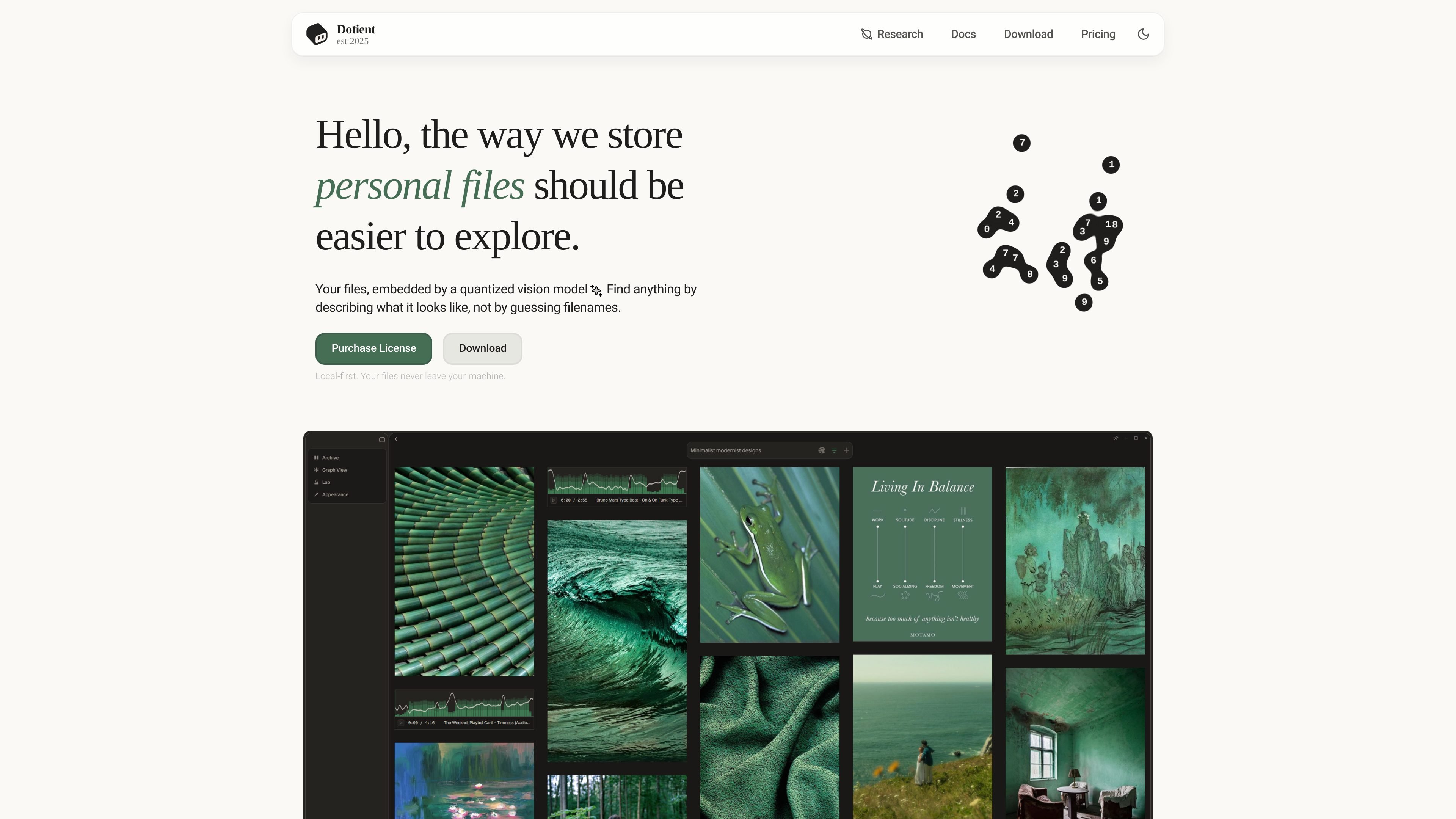
Visual search
Search for files with natural-language queries based on what they look like, rather than only on filenames or tags. The site also says signal tuning can make results more specific.
Dotient is a local-first desktop application for organizing and searching personal file archives with AI embeddings and visual search. It is designed for people who want to find images and media by describing what they look like instead of relying on filenames, folder names, or manual tagging.
The product runs on the user’s own machine and the site says files never leave the device. After import, Dotient indexes the archive locally with a quantized vision and text model, then lets users search, browse, group, annotate, and explore related items through its gallery, graph, signals, and cubbies workflows.
Search for files with natural-language queries based on what they look like, rather than only on filenames or tags. The site also says signal tuning can make results more specific.
The app embeds files with a quantized vision and text model and creates searchable profiles. The docs frame this as AI embeddings running on the user's own machine.
Browse your archive in a node-based graph or a force-directed WebGL graph, with clusters and similarity edges that help you see related files together.
Group files into Cubbies for collections, moodboards, todo lists, annotations, and freeform canvas layouts. The docs describe drag-and-drop arrangement and sticky notes inside Cubbies.
Create and combine Signals to train semantic classifiers, intersect concepts, and tune results. The research docs also mention hubness analysis as part of this workflow.
Browse media in a virtualized masonry grid, search by text or color, filter results, and inspect media details. The docs also point to settings for appearance and embedding parameters.
Photographers and videographers can import large shoot archives and search for a specific scene or frame without adding tags first. The homepage explicitly calls out finding shots across hundreds of folders by description.
Designers and art directors can keep reference dumps, mood boards, and inspiration folders in Cubbies, then annotate them with notes and layout them on a freeform canvas.
People with years of personal photos can search by scene cues such as beach sunset or a family member’s name signal, then review matching results inside the gallery.
Users trying to understand how a collection is related can open the graph view to inspect similarity clusters and connections between files.
Users who want more relevant results can label examples, create signals, and tune semantic classifiers so the app surfaces files that better match their own definitions.
Dotient is a local-first desktop app. The source says it runs on your own machine, and the download page offers installers for Windows and macOS.
You download the app installer, activate a license key, import files, and then wait for the app to index them locally before searching. The docs also point new users to a Getting Started guide that covers install through first search.
The app is built around AI embeddings and visual search. It indexes imported files with a quantized vision and text model, then lets you search by describing what something looks like or by using text and color filters in the gallery.
The docs describe gallery browsing, signals, cubbies, graph exploration, settings, and reference material for keyboard shortcuts, supported file formats, and import methods. That suggests a fairly complete single-user workflow inside the desktop app, but the source does not describe collaboration features.
The site states that files stay on your machine and that the app works fully offline. No external service is described for indexing or searching in the provided sources.

Dokkio is a cloud content organization and search platform for teams and individuals working across services like Google Drive, Dropbox, Gmail, Box, Slack, and OneDrive. It helps users search, tag, organize, and understand files, attachments, pages, and screenshots from one place.

小艺 is Huawei’s AI smart assistant for Q&A, writing, document reading, code help, image recognition, and file drag-and-drop.

GetESP analyzes CSV email lists to identify recipient ESPs and spam protection tools, helping segment lists and choose the right provider for better deliverability.

SupPixel AI is a web-based image enhancement and upscaling tool to improve resolution, clarity, and detail in photos and visuals, with background processing, credits, and plans.

My QR Code is a web-based QR code generator for links, vCards, files and more, with design customization, export formats and scan tracking.

Anara is an AI research workspace that searches your library and the web, then helps you write with cited claims and source-backed answers.